

Get clients to rebook by asking at checkout, every visit: recommend when to come back, then offer two easy answers, book it now or get a reminder. Back it with a reminder timed to each service and one welcome-back message when someone passes their usual window. Measure two numbers by service first: clients who booked their next visit, and clients who came back.
Free worksheet
Build your rebooking routine
Start with one service: measure how many clients book their next visit, then write the checkout question, the reminder, and the welcome-back message.
Get the rebooking planThis is a working plan for spas, salons, and solo beauty professionals: measure rebooking by service, ask at checkout, remind at the right time, and welcome back the clients who slipped away. Every client who comes back is one you do not have to find again.
How do I calculate my rebooking rate?
Your rebooking rate is the share of eligible clients for one service who book their next visit before they leave. Divide checkout rebookings by eligible clients seen. In the example below, 32 of 80 is a 40 percent checkout rate, and 46 of 80, or 57.5 percent, actually came back. Both are illustrative, not benchmarks.
Measure by service, and keep two numbers apart: clients who booked their next visit, and clients who actually came back. A booking is a reservation. A return visit is a client in the chair.
Before you count, define four things:
- Eligible clients: people seen for this service in the period who are expected to return for it. Leave out one-off services and clients who told you they moved.
- People, not appointments: count each client once, even if they booked twice.
- The window: the return interval the provider recommends for this service. A fill and an occasional facial need different windows.
- Maturity: count “came back” only after the window has passed for everyone in the group.
For the last two to three months, record:
| What to count | Why it matters |
|---|---|
| Eligible clients seen, by service | The base for each rate |
| Booked their next visit before leaving | Your checkout rebooking rate |
| Booked later, within the window | Reminders working |
| Came back for that visit | The visits that actually happened |
| Not back yet, past the window | Clients to welcome back |
| New versus returning clients | New clients often need more encouragement |
80 clients, one service: booked versus came back
- Eligible clients seen 80 clients
- Booked their next visit within the window 52 clients65% of the previous stage
32 booked at checkout and 20 booked later, within the window.
- Came back for that visit 46 clients88% of the previous stage
- 4 clients canceled and did not rebook
- 2 clients missed without notice
Add the 20 later bookings to the 32 made at checkout, and 52 of 80, or 65 percent, booked another visit within the window. The worksheet calls that the on-schedule rate and tracks it beside the checkout and return rates; it counts bookings, not visits. The gap between 52 booked and 46 who came back is a no-show and cancellation problem, which our no-shows guide covers.
This is how Beauty Biz Pro reports first visits in the wax studio campaigns we run: booked, attended, and rebooked visits are counted separately from messages, because a message is not a client and a booking is not a visit.
Ask at checkout, every time
The easiest moment to rebook is while the client is still in the chair, looking at the result. Make the question part of every appointment, not something you remember on good days.
-
Checkout, day 0
Recommend and offer to book
Name the interval you recommend. Offer real times, or a reminder.
-
[A few days before the recommended date]
Due-soon reminder
Name the service and provider. Link straight to that service.
-
[Past the window]
Welcome-back message
Check what they can book now before you send a link.
-
[A few days later]
One follow-up, then stop
No reply means not now. Leave it there.
Checkout question
Solo artist: “Your [skin / lashes / brows] looked great today. I recommend coming back in [provider-recommended interval]. Want to book that now, or should I send you a reminder?”
Front desk or team: “[Provider] recommends coming back in [provider-recommended interval]. I have [real time] or [real time]. Want one of those, or a reminder?”
- Recommend a timing based on what you saw today. The professional decides the interval.
- Offer two choices, and treat “send me a reminder” as a good answer.
- Have real times ready, so booking takes seconds.
- Write down what was recommended, so the reminder can refer to it.
Remind at the right time for each service
A reminder works when it arrives shortly before the client would naturally think about booking, with a link that goes straight to the right service.
Due-soon reminder
“Hi [first name], it has been [time since last visit] since your [service] with [provider], who recommended coming back around now. Here are a few times this week: [real times]. Or book any time here: [direct link to that service].”
- Time reminders by service. A lash fill reminder and a facial reminder should not go out on the same schedule.
- Link to the specific service and provider, not your home page.
- Keep it short and personal. Mention the last service by name.
- Send messages only to clients who have agreed to receive them, and include a way to opt out.
Our no-shows guide covers confirmations and reminders for appointments that are already booked. Once the next visit is on the calendar, Beauty Biz AI’s No-Show Reducer sends the confirmation and the reminder before it.
Welcome back clients who drifted away
Some clients simply get busy. A short message after their usual window gives them an easy way back, as long as it offers something they can actually book.
Check eligibility before you send. Time away can change what someone can book:
- Time-limited services. A lash client past your fill window usually needs a new set, not a fill. Link to the service they qualify for today.
- Services that start with a consultation or a patch test. If your policy requires one after a gap, offer that first.
- Consent. Only clients who agreed to receive messages, and who have not asked you to stop.
Welcome-back message
“Hi [first name], we have not seen you since your [last service] and wanted to check in. Since it has been a while, the right booking now is [the service they qualify for, for example a new full set rather than a fill]. I have [real time] or [real time], or you can book here: [direct link to that service]. No pressure either way.”
- Start with clients a little past their usual window, not those gone for years.
- Send one message and one follow-up at most, then leave it.
- Note why people say they left. A pattern, such as price, timing, or results, tells you what to fix.
Sort past clients by the service they had
Jake’s advice to owners with a client list sitting in their booking software: sort past clients by the service they had, brow clients in one group and waxing clients in another. When a couple of waxing openings come up, text your previous waxing clients directly: it has been a while, here are the open dates, do you want one of those spots?
Takeaway: a welcome-back message lands when it names the service the client actually had and offers a real time for it. Sort first, then send, and only to clients who agreed to receive messages.
Keeping up with this by hand takes time every week. See Reactivation in Beauty Biz AI if you want the timing and wording set up around your services before anything is sent.
Make coming back feel worth it
Rebooking is easier when clients can see what a regular routine does for them.
- Explain what regular visits do for the result, in plain words and without promises.
- If you offer a series or membership, say exactly what a member gets: which service, how often, and how that matches the service’s natural return rhythm. Make it easy to pause or cancel.
- Price any series or membership above its costs. Our pricing guide covers checking this.
- Thank clients by name when they come back. People return to places where they feel remembered.
A membership is one option, not the answer to every retention problem. Fix the checkout question and the reminder first.
Run a four-week rebooking plan
-
Week 1
Measure booked and returned by service for recent months
Keep: the rebooking worksheet.
-
Week 2
Start the checkout question with every client
Keep: checkout rebookings per day.
-
Week 3
Set service-based reminders with direct booking links
Keep: reminder timing and copy.
-
Week 4
Send welcome-back messages to eligible lapsed clients
Keep: replies, bookings, and reasons given.
Four weeks is a planning period, not a promised result. Keep measuring by service, and count return visits once each window has passed, because seasons and new services change the pattern.
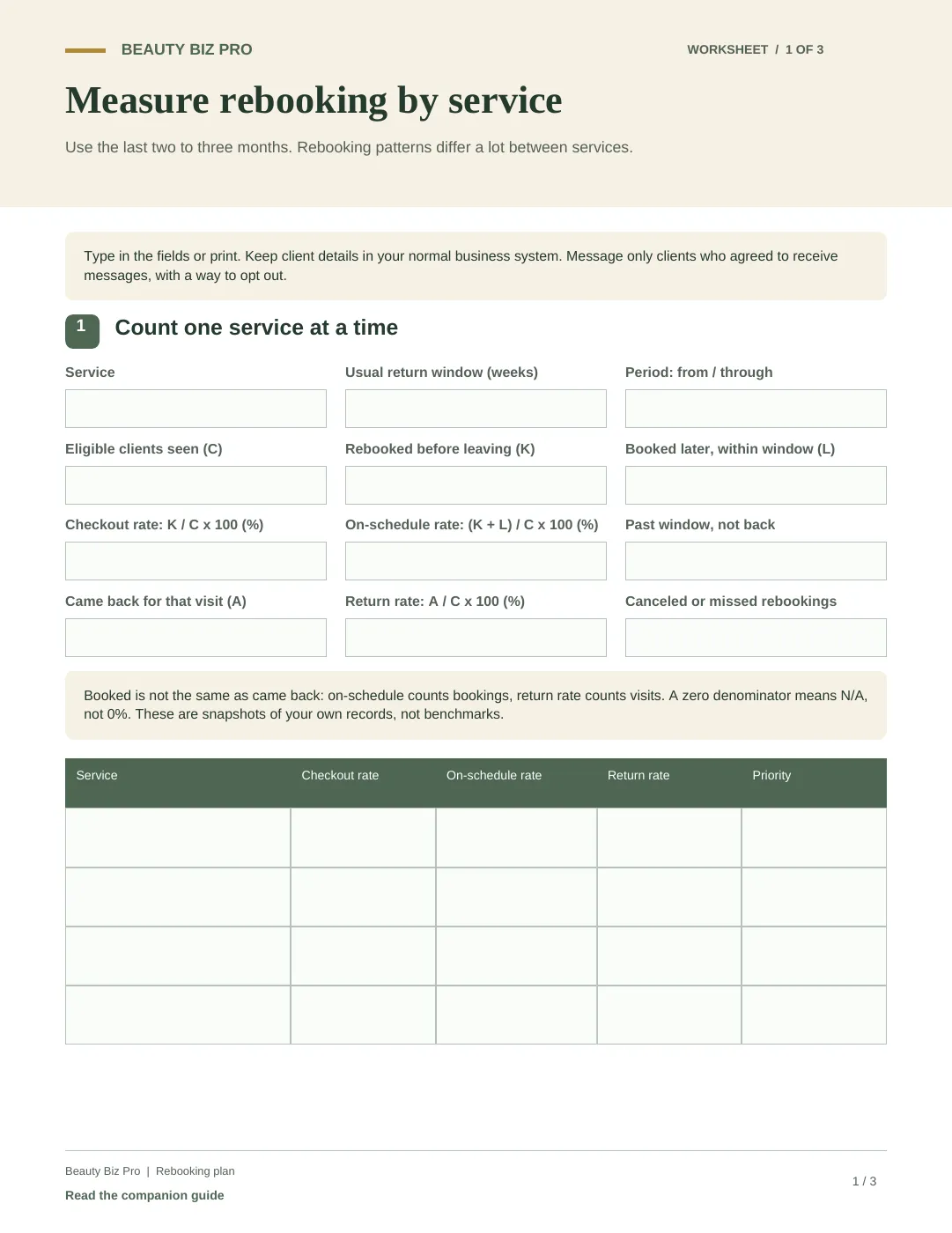
Free worksheet
Build your rebooking routine
Start with one service: measure how many clients book their next visit, then write the checkout question, the reminder, and the welcome-back message.
Inside
- Checkout, within-window booking, and return rates for one service
- Your checkout wording, with two choices
- Reminder timing and a direct booking link for each service
- Welcome-back wording and when to follow up
- A weekly log and a week 4 review
Want help doing this?
Want reminders and welcome-back messages set up around your services?
Reactivation in Beauty Biz AI builds follow-up around your rebooking windows and service rules. We start by reviewing your booking software, your return windows, and who answers when a client replies.
See client reactivation